Showing posts with label android. Show all posts
Showing posts with label android. Show all posts
Friday, 3 July 2015
Thursday, 21 May 2015
ONE PLUS TWO SPECS LEAKED!!!!!!!!
Never settle. the manufacturer who gave a punch in the face to all the big shot brands in 2014. so how are they doing now in 2015?well lets find out but before that its chinmay here from cmreviews where you get more than just reviews and you are watching oneplus two specs leaked and overview

today there was a leak of oneplus two specs . the leak was of geekbench 3 benchmark score and the let's start from the top . the score is 1256 for single core score and multi core score is a huge 4093. looks pretty awesome already aint it? well lets move ahead . the operating system is android 5.1 thats the latest and greatest for now. The model number is oneplus one A2001. wait a second isn't this the post of one plus two?? well yes it is . As we know the model number for 1+1 was A0001 and this is A2001 so technically this is 1+2. anyways let's move ahead .The processor is qualcomm 1.55ghz octa core processor. Yes it is one single processor with all 8 cores clocked at 1.5ghz so it is something new which we have not seen earlier so keep waiting for more surprises. The processor id is ARM implementer 65 architecture 8 variant 1 part 3335 revision 1 so according to me it is a new processor probably a new series of processor and this being the first variant of the new series. but again this is my taught and let me know in the comment section below if i'm wrong. The cache is not mentioned yet but we will wait for it. next up is the memory which will disappoint a lot of oneplus fans it is still 3gb . i know 3gb is not less buy in 2015 we were really expecting a 4gb ram phone from oneplus but looks like we are getting only 3gb this year.
other specs of the phone are not been revealed yet like what kind of camera will be featured on the oneplus two or what will be the size and resolution of the display but according to me it should be same 5.5inches in size and a qhd screen as 5.5 inches is huge for a smartphone and qhd being the standard for flagships these days. also for camera i'm expecting a 16 megapixel or higher camera with OIS and 4k video recording
Also a fingerprint scanner is expected to be seen on the phone which will be better than apple's scanner but the question is where will it be placed? it is obvious that oneplus 2 will not have physical navigation keys so most probably it will be on the back of the phone below the camera optics. but nothing can be said to be official till we don't see the design of the phone so thats all for now that we know and that's pretty much it for now. Go ahead and mention your thoughts in the comment section below and let me know what you are expecting to see in oneplus two. and with this we wrap up for today and i’ll be back with you another time . until then cya.
Wednesday, 12 November 2014
ANDROID LOLLIPOP UPDATE ROLLED OUT FOR NEXUS DEVICES : SWEETNESS OVERLOADED
Finally the wait is over for nexus devices. google finally rolled out OTA update for its nexus lineup. so after motorola moto x and moto g its finally time for the nexus users who are waiting impatiently from couple of week but its better late than never.

Yes the nexus rollout have begun but its not so happy news for some users. currently the nexus 10 , nexus 7 2012 (wifi), nexus 7 2013(wifi), and the nexus 5 are the only devices which are getting the update. nexus 7 2012 and nexus 7 2013 cellular variants and nexus 4 users have to be little more patient for the update. Also as everyone will be downloading the update right now so there will be issues with the server so you might need to hold on for couple of hours or even a day or two to get your hands on with lollipop . But those who can't wait can go here and download factory images of your particular device and flash it manually. make sure that you follow the instructions properly or it can harm your device.
After the moto x(2nd gen) and moto g(2nd gen) now its the nexus 5, 7 and 10 but we are also seeing lg Optimus g3 getting a heavily skinned lollipop update but thats for another article and will be updated as soon as possible . until then keep checking for the OTA and enjoy the sweetness. cya next time with another exciting update.

Yes the nexus rollout have begun but its not so happy news for some users. currently the nexus 10 , nexus 7 2012 (wifi), nexus 7 2013(wifi), and the nexus 5 are the only devices which are getting the update. nexus 7 2012 and nexus 7 2013 cellular variants and nexus 4 users have to be little more patient for the update. Also as everyone will be downloading the update right now so there will be issues with the server so you might need to hold on for couple of hours or even a day or two to get your hands on with lollipop . But those who can't wait can go here and download factory images of your particular device and flash it manually. make sure that you follow the instructions properly or it can harm your device.
After the moto x(2nd gen) and moto g(2nd gen) now its the nexus 5, 7 and 10 but we are also seeing lg Optimus g3 getting a heavily skinned lollipop update but thats for another article and will be updated as soon as possible . until then keep checking for the OTA and enjoy the sweetness. cya next time with another exciting update.
MOTO G (2ND GEN) GETS SWEETNESS OF LOLLIPOP
Android lollipop is rolled out in form of a soak test version to a phone which have surprised everyone once again today. Its not a nexus nor a high end flagship phone . Its none other than Moto g 2nd gen.

surprised? well thats not all as this is the first build of lollipop hat have crossed the beta stage and its kind of what we call a mac "the golden master version" . But as of now the update is limited to unlocked moto G 2nd gen and will be rolled out to other units too in the nearest future. also this update is currently unavailable in india so I'm unable to get my hands on with it. if you want to flash the update manually then click here to get the details . we all expected the lollipop to be sooner on moto g 2nd gen than most other mid range phones but never really expected it would be so soon and before the flagships. well motorola have surprised everyone and we just can't wait to see what the company have to go show next . If you don't have an android phone and you are looking forward to buy one then it is good time to buy moto g 2nd gen now . if you are interested then click here to order your moto g 2nd gen now. and thats all for day guys and i'll be back with more news soon until then cya next time

surprised? well thats not all as this is the first build of lollipop hat have crossed the beta stage and its kind of what we call a mac "the golden master version" . But as of now the update is limited to unlocked moto G 2nd gen and will be rolled out to other units too in the nearest future. also this update is currently unavailable in india so I'm unable to get my hands on with it. if you want to flash the update manually then click here to get the details . we all expected the lollipop to be sooner on moto g 2nd gen than most other mid range phones but never really expected it would be so soon and before the flagships. well motorola have surprised everyone and we just can't wait to see what the company have to go show next . If you don't have an android phone and you are looking forward to buy one then it is good time to buy moto g 2nd gen now . if you are interested then click here to order your moto g 2nd gen now. and thats all for day guys and i'll be back with more news soon until then cya next time
Thursday, 23 October 2014
MIRROT YOUR LOCAL CONTENT FROM YOUR PHONE TO YOUR TV
but someone like me who have a sony smart tv and a samsung phone again come a problem for mirroring screen. and as I'm from india chrome cast is not available here. only samsung stock rom allows yo do screen mirroring natively but that is limited to samsung's apps like the music player galley and video player which are not the best ones out there. also i use cyanogenmod 12 on my phone thus samsung screen mirroring was no help either.
so everyone out there who don't own a samsung and sony phone or if you are just like me who doesn't use a stock rom and if you have a smart tv / chrome cast then you have a great option to cast your content on your tv called local cast

local cast is a free app which you can download from the google play store. you can share all your movies , pictures, music from your phone to your tv.

local cast have fairly simple simple to use and it is developed with material ui which is both visually appealing as well as easier to understand.

swipe from the left and you will get all the options like folders , quest, libraries etc.
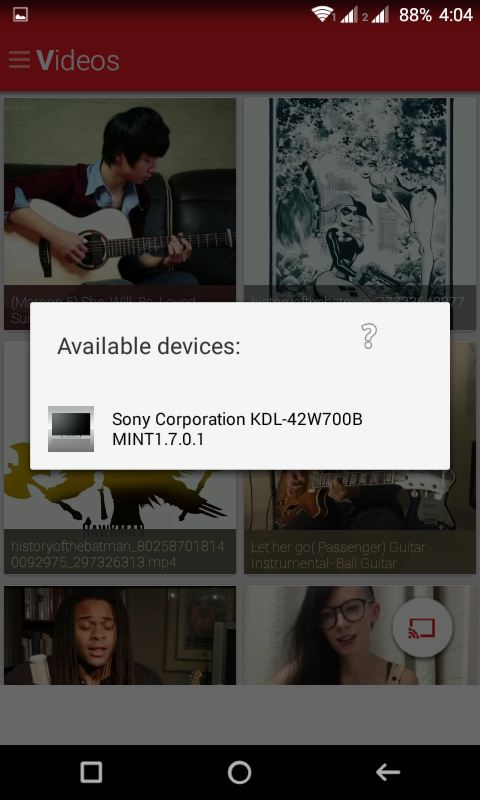
clicking on the bottom right circle you will get option where you want to mirror your screen for example corrects smart tv apple tv etc. As you can se it shows me my sony smart tv to connect.

once connected you can share the content you want from your phone to your tv.

PROS
* the app is free of cost
* fairly simple with material ui
* works very fast
CONS
*major features are limited for corrects only
*mirroring pics didn't dork for me
*sometimes played random video which was not selected by me
overall the app is very good with minor bugs. the user needs to use a corrects to make full use for its features. regardless of the limitations the app is still a very good performer as mirroring videos and music comes handy a lot of times and without this app this is not possible for most of the devices. and thats all for now guys ill be back with another news soon.
GOOGLE PLAY MUSIC GETS MATERIAL UPDATE
With the sweetness of android lollipop (5.0). android is getting a major visual overhaul and material ui is the trend this time. with the android lollipop release date coming soon many of the apps are getting visual updates and among them is none other than google play music which got leaked with the material ui.


overall the flat theme is noticed in evert corner. there are some small but very attractive animations which can't be seen in pictures but they are there to make you experience better. you can download the latest google play music from here . just install it like a normal apk .
As time is moving the developers are working hard to make their apps look better with the new material ui and we will be here to cover them up. for that stay tune for more updates and don't forget to subscribe us on youtube . thats all for now guys cya later with another awesome news.
overall the flat theme is noticed in evert corner. there are some small but very attractive animations which can't be seen in pictures but they are there to make you experience better. you can download the latest google play music from here . just install it like a normal apk .
As time is moving the developers are working hard to make their apps look better with the new material ui and we will be here to cover them up. for that stay tune for more updates and don't forget to subscribe us on youtube . thats all for now guys cya later with another awesome news.
Monday, 17 March 2014
GET NOKIA X LAUNCHER ON ANY ANDROID PHONE
Nokia have been creating a huge buzz in smartphone world thanks to its nokia x and everyone wants to try the nokia x launcher. well thanks to the versetility of android world you can get it on your phone and here is a video to show you how
dont fotget to subscribe and hit that like button for more videos
Monday, 24 February 2014
GALAXY S5 : INITIAL impressions
Yes the most anticipated device is finally revealed at MWC today and its no other than galaxy s5. another flagship phone by samsung under the s family. samsung's galaxy phones have always been the top of the line phones and pure beast in performance, so the question is what do we get this time.lets start with the design
DESIGN


we are truly disappointed to see the same design again on the galaxy s5. the phone looks almost identical to the galaxy s4 and there is no major overhaul in design. there are some noticeable changes in design like the mostly rectangular form factor like the note 3 but we dont get the stiched leather back like note 3. the physical home button have a fingerprint scanner and the menu key is replaced by a multi tasking key which would be great as after 7 or 8 months of use the home key usually gets flushed in the design as it serves for 3 features ( home, multi tasking, s voice).the phone comes in 4 colors namely the white, blue, gold, black.
Specifications
this time we see a Qualcomm snapdragon 2.5ghz quad core processor. yes we dont see a octa core version this time. the phone comes with 2gb of ram and internal storage is 16/32gb which is further expandable using micro sd card. the screen is slightly bigger now, its 5.1" 1080p super amoled display. there is a 2800mah battery.the phone is ip67 certified which means it is dust proof and water resistant. the camera is not 16mp with great software improvements and pictures taken from galaxy s5 are really great. below the camera we see the heartbeat monitoring sensor which is welcome edition as we didn't see this earlier in any samsung phones.

SOFTWARE
the phone comes with android 4.4.2 and a new build of touchwiz ui. the ui have somewhat a flat look but it looks same as earlier in some places. some of the icons have been redesigned and most of the icons are still the same and the icons in the notification panel /quick toggle panel are round. the setting menu gets a complete overhaul and there ate no more tab views but icon grid which are placed as per their category. this reminds us of the settings menu in samsung's bada os which had list view with all settings in one place. the overall ui is more colourful. the ultra power saving mode gives everything a greyscale and a very minimalistic look.the Shealth app gives you more features now using the heart beat monitoring sensor at the back but how many of you will use it? we also see all the features from galaxy s4 and the galaxy note 3 on the new galaxy s5.
CONCLUSION
Yes the galaxy s5 is a powerful device but it still have the old looks which we have been waiting to change for over 2 years now. the presentation was more focusing on the software rather than hardware which is really disappointing again because there is no mention of which cpu the phone is having or regarding the gpu. overall we are not too happy with the device. Thats all for now guys i'll be back with some more news from MWC so keep following us on twitter @cmreviews2594 for more news.
DESIGN
we are truly disappointed to see the same design again on the galaxy s5. the phone looks almost identical to the galaxy s4 and there is no major overhaul in design. there are some noticeable changes in design like the mostly rectangular form factor like the note 3 but we dont get the stiched leather back like note 3. the physical home button have a fingerprint scanner and the menu key is replaced by a multi tasking key which would be great as after 7 or 8 months of use the home key usually gets flushed in the design as it serves for 3 features ( home, multi tasking, s voice).the phone comes in 4 colors namely the white, blue, gold, black.
Specifications
this time we see a Qualcomm snapdragon 2.5ghz quad core processor. yes we dont see a octa core version this time. the phone comes with 2gb of ram and internal storage is 16/32gb which is further expandable using micro sd card. the screen is slightly bigger now, its 5.1" 1080p super amoled display. there is a 2800mah battery.the phone is ip67 certified which means it is dust proof and water resistant. the camera is not 16mp with great software improvements and pictures taken from galaxy s5 are really great. below the camera we see the heartbeat monitoring sensor which is welcome edition as we didn't see this earlier in any samsung phones.
SOFTWARE
the phone comes with android 4.4.2 and a new build of touchwiz ui. the ui have somewhat a flat look but it looks same as earlier in some places. some of the icons have been redesigned and most of the icons are still the same and the icons in the notification panel /quick toggle panel are round. the setting menu gets a complete overhaul and there ate no more tab views but icon grid which are placed as per their category. this reminds us of the settings menu in samsung's bada os which had list view with all settings in one place. the overall ui is more colourful. the ultra power saving mode gives everything a greyscale and a very minimalistic look.the Shealth app gives you more features now using the heart beat monitoring sensor at the back but how many of you will use it? we also see all the features from galaxy s4 and the galaxy note 3 on the new galaxy s5.
CONCLUSION
Yes the galaxy s5 is a powerful device but it still have the old looks which we have been waiting to change for over 2 years now. the presentation was more focusing on the software rather than hardware which is really disappointing again because there is no mention of which cpu the phone is having or regarding the gpu. overall we are not too happy with the device. Thats all for now guys i'll be back with some more news from MWC so keep following us on twitter @cmreviews2594 for more news.

NOKIA X/X+/XL : THE GOOD , THE BAD AND EVERYTHING ELSE
Finally rumours were true after all. Finally after such a long anticipation we see android phones from Nokia. Not one nor two but surprisingly Nokia have started its android family with 3 new awesome phones which forms the NOKIA X family. These are not any high end android phones but these are something we have been waiting for from long time.
DESIGN

As we can see the design element is almost identical to the Nokia's current link of asha and windows phones which looks really great and doesn't feel cheap in hand but at the same doesn't even look premium. also we notice the 2 new colors with the Nokia x family which we have never seen with the Nokia's windows phones or Nokia's asha phones so this comes as a welcome edition.
SPECIFICATIONS
the Nokia x shares somewhat similar hardware under the hood so lets have a in depth look at the hardware specifications.
Nokia x
display 4" 800x400 (wvga)
qualcomm snapdragon s4 processor 1ghz dual core
512mb ram
4gb internal storage (32gb expandable using micro sd card)
3mp camera
dual sim
1500mah battery
Nokia x+
display 4" 800x400 (wvga)
qualcomm snapdragon s4 processor 1ghz dual core
768mb ram
4gb internal storage (32gb expandable using micro sd card)
3mp camera
dual sim
1500mah battery
Nokia xl
display 5" 800x400 (wvga)
qualcomm snapdragon s4 processor 1ghz dual core
768mb ram
4gb internal storage (32gb expandable using micro sd card)
5mp camera
dual sim
2000mah battery
so as we can see the Nokia x series seems to share somewhat the same hardware, apart from difference in ram and display size there is no other change.
SOFTWARE
this is the place where things get little surprising. yes the Nokia x series runs googles android open source project(AOSP) but there is no mention about the android version. the UI looks like a hybrid mixture of android + windows phone + asha series as we get the fast lane feature and tiles ui home screen. whats most surprising about the Nokia x series is that there is NO GOOGLE PLAY STORE. Yes the google play store is no where to be found and that looks like a really big drawback. there is no information weather we could sideload apk and install them on these phones but there is Nokia app store which have android apps and Nokia have promised there will be more third party app stores in future.
THE GOOD:
well must say this is a really good approach by Nokia into the android world with 3 new phones but at the same time the missing google play services is really disappointing. the prising of this phones is very low and will be in entry level segment . overall the Nokia x series looks promising with its tiles ui which is fast and fluid. Nokia also have a bunch of great apps which we have been seeing on their windows phone series lately and we are happy to see them on android. so how will they actually be in end consumer view? well that we will know when we finally get to do a hand on review with the phone and thats all for today guys we will be back soon with more news and reveals happening at MWC, so dont forget to follow us at twitter @cmreviews2594 see you next time.
DESIGN
As we can see the design element is almost identical to the Nokia's current link of asha and windows phones which looks really great and doesn't feel cheap in hand but at the same doesn't even look premium. also we notice the 2 new colors with the Nokia x family which we have never seen with the Nokia's windows phones or Nokia's asha phones so this comes as a welcome edition.
SPECIFICATIONS
the Nokia x shares somewhat similar hardware under the hood so lets have a in depth look at the hardware specifications.
Nokia x
display 4" 800x400 (wvga)
qualcomm snapdragon s4 processor 1ghz dual core
512mb ram
4gb internal storage (32gb expandable using micro sd card)
3mp camera
dual sim
1500mah battery
Nokia x+
display 4" 800x400 (wvga)
qualcomm snapdragon s4 processor 1ghz dual core
768mb ram
4gb internal storage (32gb expandable using micro sd card)
3mp camera
dual sim
1500mah battery
Nokia xl
display 5" 800x400 (wvga)
qualcomm snapdragon s4 processor 1ghz dual core
768mb ram
4gb internal storage (32gb expandable using micro sd card)
5mp camera
dual sim
2000mah battery
so as we can see the Nokia x series seems to share somewhat the same hardware, apart from difference in ram and display size there is no other change.
SOFTWARE
this is the place where things get little surprising. yes the Nokia x series runs googles android open source project(AOSP) but there is no mention about the android version. the UI looks like a hybrid mixture of android + windows phone + asha series as we get the fast lane feature and tiles ui home screen. whats most surprising about the Nokia x series is that there is NO GOOGLE PLAY STORE. Yes the google play store is no where to be found and that looks like a really big drawback. there is no information weather we could sideload apk and install them on these phones but there is Nokia app store which have android apps and Nokia have promised there will be more third party app stores in future.
THE GOOD:
- ANDROID
- FAST LANE UI
- CHEAP PRISING
THE BAD
- NO GOOGLE PLAY STORE
- ONLY BUDGET PHONES NO FLAGSHIP PHONE
- GOOGLE PLAY SERVICES NOT PRESENT
well must say this is a really good approach by Nokia into the android world with 3 new phones but at the same time the missing google play services is really disappointing. the prising of this phones is very low and will be in entry level segment . overall the Nokia x series looks promising with its tiles ui which is fast and fluid. Nokia also have a bunch of great apps which we have been seeing on their windows phone series lately and we are happy to see them on android. so how will they actually be in end consumer view? well that we will know when we finally get to do a hand on review with the phone and thats all for today guys we will be back soon with more news and reveals happening at MWC, so dont forget to follow us at twitter @cmreviews2594 see you next time.
Saturday, 22 February 2014
ANDROID TIP OF THE DAY: REPLACE STOCK KEYBOARD WITH A BETTER ONE
Well with every smartphone manufacturer we see different customisations in android UI. with different ui we see different keyboards. but how good are they? you might feel them very good and fast but how flexible are they in understanding your typing styles? not so great because they miss the customisation option or there is very minimal customisation some examples are samsung and sony keyboards

well as i always say android is most popular thanks to is flexibility and ability of customisation of every aspect of the phone UI and there are more than 100s of keyboards available in google play store to replace your stock keyboard so how to choose which one is best for you? well among all the keyboards available out there there is one that shines out really well and here is todays android tip of the day
REPLACE YOUR STOCK KEYBOARD WITH SWIFT KEY
swiftkey comes with both trial and paid versions and is fairly easy to install. just click here to download and try the free version and follow the steps as shown in the pic bellow

once done enjoy fast and most accurate predictive typing on android. and if you dont agree with out pic then here are some alternative keyboards to swift key
A.I. type keyboard free
keymonk keyboard free
swype keyboard free
and that wraps up everything for today guys see you next time with another tip so dont forget to follow on twitter @cmreviews2594
well as i always say android is most popular thanks to is flexibility and ability of customisation of every aspect of the phone UI and there are more than 100s of keyboards available in google play store to replace your stock keyboard so how to choose which one is best for you? well among all the keyboards available out there there is one that shines out really well and here is todays android tip of the day
REPLACE YOUR STOCK KEYBOARD WITH SWIFT KEY
swiftkey comes with both trial and paid versions and is fairly easy to install. just click here to download and try the free version and follow the steps as shown in the pic bellow
once done enjoy fast and most accurate predictive typing on android. and if you dont agree with out pic then here are some alternative keyboards to swift key
A.I. type keyboard free
keymonk keyboard free
swype keyboard free
and that wraps up everything for today guys see you next time with another tip so dont forget to follow on twitter @cmreviews2594
Friday, 21 February 2014
ANDROID TIP OF THE DAY : DITCH YOUR USB CABLE AND USE WIRELESS TRANSFER
So irritated by your usb cable? getting this annoying error in your mac or connection problems in your pc? or simply like me are you too lazy to get up and connect a usb to your pc and phone? well its time to ditch your usb cable and use a better and faster substitute using your wifi router

so all of you frustrated and lazy users like me here is android tip of the day
Ditch your usb cable with airdroid
prerequisite - android phone, pc/mac, wifi router
yes airdroid is faster and better replacement for the jobs done by a usb cable for file transfer. all you need to do is go to google play store and search for airdroid or simply click here

next step is go to your pc/mac and go to web.airdroid.com and then on your phone open airdroid and click to scan the OR code


and thats all you have to do and now you can transfer your files wirelessly and at much faster rate compared to usb file transfer. airdroid can do a lot more than just file transfer to know more checkout our in dept explanation of airdroid features.thats all for today guys see you tomorow with another tip so done forget to follow us at twitter @cmreviews2594
so all of you frustrated and lazy users like me here is android tip of the day
Ditch your usb cable with airdroid
prerequisite - android phone, pc/mac, wifi router
yes airdroid is faster and better replacement for the jobs done by a usb cable for file transfer. all you need to do is go to google play store and search for airdroid or simply click here
next step is go to your pc/mac and go to web.airdroid.com and then on your phone open airdroid and click to scan the OR code
and thats all you have to do and now you can transfer your files wirelessly and at much faster rate compared to usb file transfer. airdroid can do a lot more than just file transfer to know more checkout our in dept explanation of airdroid features.thats all for today guys see you tomorow with another tip so done forget to follow us at twitter @cmreviews2594
Thursday, 20 February 2014
ANDROID TIP OF THE DAY; REPLACE STOCK GALLERY WITH BETTER ONE
Different android devices from different manufacturers have their own custom galleries and camera apps but these galleries are slow and laggy specially on low end devices and devices with low power. some examples are samsung gallery, sony gallery and surprisingly sometimes stock android gallery too.


so what do we do about it? so here is the android tip of the day
REPLACE YOUR STOCK GALLERY WITH QuickPic
QuickPic is is a really light and fast gallery app which needs only 553kb in size. and what would be better than seeing your pics without lag? well thats all for today guys will be back again tomorrow with another tip. dont forget to follow on twitter @cmreviews2594 . thank you guys see you next time
Wednesday, 19 February 2014
ANDROID TIP OF THE DAY:REMOVE CLUSTER TO GET LAGG FREE EXPERIENCE [BASIC]
Android gives you great productivity by ability of adding app shortcuts or widgets on your home screen. you can get almost everything on your homescreen like this

this gives great productivity but also causes lag. well we dont always need all these apps and widgets so todays tip of the day is
Remove apps shortcuts and widgets which are not needed. this will make yout ui more fluid and cluster free. if you still need some apps then you try folders too which works great.

thats all for today guys will see you tomorrow with another tip so keep learning.
this gives great productivity but also causes lag. well we dont always need all these apps and widgets so todays tip of the day is
Remove apps shortcuts and widgets which are not needed. this will make yout ui more fluid and cluster free. if you still need some apps then you try folders too which works great.
thats all for today guys will see you tomorrow with another tip so keep learning.
Tuesday, 18 February 2014
ANDROID TIP OF THE DAY : TURN OF GPS WHEN NOT NEEDED [basic]
Android can give you a ton of information about your surroundings using its gps . you can get information about your location, weather, food destinations around you and lot more

but often we fail to realise that we dont need it all time and we end up wasting a lot of battery and internet data so here is todays tip
TURN OF LOCATION SETTINGS WHEN NOT NEEDED. THIS WILL HELP YOU IMPROVE YOUR BATTERY BACKUP ALSO SAVE A LOT OF YOUR INTERNET DATA
to do this just head over to settings > search for location services > turn it off or you can keep it at low battery use

thats all for today guys will be back tomorrow with another tip till then keep exploring and keep learning
but often we fail to realise that we dont need it all time and we end up wasting a lot of battery and internet data so here is todays tip
TURN OF LOCATION SETTINGS WHEN NOT NEEDED. THIS WILL HELP YOU IMPROVE YOUR BATTERY BACKUP ALSO SAVE A LOT OF YOUR INTERNET DATA
to do this just head over to settings > search for location services > turn it off or you can keep it at low battery use
thats all for today guys will be back tomorrow with another tip till then keep exploring and keep learning
Monday, 17 February 2014
ANDROID TIP OF THE DAY: TURN OF SYNC TO SAVE BATTERY/DATA [basic]
Alot of people are new to android and there is no harm being a newbee/learner and to help all you new people I've started with ANDROID TIP OF THE DAY starting from the bare bones of android basics so lets get started
Android quick tip of the day is to disable sync of the accounts which u dont need and save a lot of battery and internet data
to do this just go to settings > scroll down to accounts> gmail> disable everything that you dont need. and do it for other accounts that you have and thats all you need to do.


thats all for today guys will be back tomorrow with a new basic tip to help you improve your android experience.
Thursday, 30 January 2014
AIRDROID v2 : AN AWESOME ALL IN ONE PRODUCTIVITY APP
There is no shortage of productivity on mobile platforms, but which ones are the best? there are some apps in the android market which pushes android into a league entirely of its own. one of such awesome app is Airdroid v2. android have cloud storage, word documents, presentation, and other productivity apps but these are about same on every platform like ios and windows phone os. but unlike windows and ios, android is far more flexible which allows you to do things far more you can imagine on other platforms. the best example of this is airdroid.
You can download airdroid from google playstore for free


once connected you can get the details about your device on the right

to transfer files to your phone just drag and drop the files from your pc to your phone by dropping into the box on right like show in the pic below

you can also get access to other apps like music, files, photos, contacts, apps.


You can download airdroid from google playstore for free
Once opened you can see the tools tab on top and there you can see options like device, apps, files, task, hotspot
You can get details about your device
Get the info/ manage the apps installed
Get a awesome file explorer
Get a good enough task manager
Thats a lot of things to do with one app but thats not all. We usually spend most of our time sitting in front of our computers screen. well instead of every time reaching for your phone its better to use the computer to do that for us . This is the biggest advantage of airdroid which allows us to remotly access our phone. just head over to airdroid.com and sign in into a airdroid account then click the start airdroid
Now go to the connection tab on your android phone and select scan qr code to scan the code on screen to get started
And thats all you need to do to get connected.
once connected you can get the details about your device on the right
to transfer files to your phone just drag and drop the files from your pc to your phone by dropping into the box on right like show in the pic below
you can also get access to other apps like music, files, photos, contacts, apps.
BUT STILL THATS NOT ALL
you get the best feature of airdroid if you have a rooted device. click the screenshot option on the windows in your pc and accept the root permission on your phone and you will get your screen on your pc like wireless mirroring with looks like realtime streaming
well isn't that great? just one app which can do a lot of tuff for you and this is the reason its at number one position in productivity apps for android. well thats all for now and i'll be back with more tips for your android devices .


.jpg)